Resources
A running AppHost from your apphost.cs, healthy Redis and PostgreSQL, and the api and stats projects with their references.
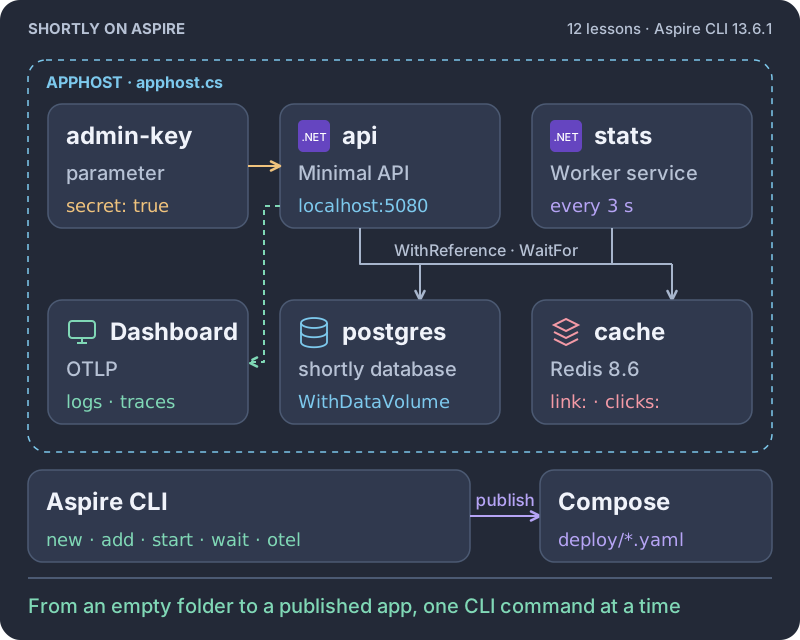
Start from an empty folder and one in-memory API. With the Aspire CLI you add an AppHost, Redis and PostgreSQL, wire the API to them, add telemetry and a background worker, keep data and secrets safe, operate the app from the terminal, and publish it as Docker Compose. Twelve lessons, about 90 minutes.
Intermediate · C#, Aspire CLI 13.6.1, PostgreSQL, Redis · About 90 minutes · Disposable browser workspace · Pro workspace in private beta
Outcomes
12 lessons in 3 modules
Each lesson starts where the previous one stopped. You add one piece from the terminal, watch it start, and press Check, so the last lesson publishes the app you built.
Module 1
Create a file-based AppHost with the Aspire CLI and let it run a real Redis container.
2 lessons · 13 minutes
Lesson 1 7 min
Scaffold a file-based AppHost next to the API, start it in the background, and ask the CLI what is running.
Lesson 2 6 min
Add the Redis hosting integration with aspire add and watch the AppHost start a real container.
Module 2
Put the API under the AppHost, move its links into PostgreSQL, cache redirects in Redis, and turn on telemetry.
4 lessons · 32 minutes
Lesson 3 7 min
Reference the API project from the AppHost, give it a health check, and call it through Aspire's proxy.
Lesson 4 9 min
Add PostgreSQL, inject its connection string into the API, and prove a link survives an API restart.
Lesson 5 8 min
Serve hot redirects from Redis with cache-aside and count every click with one atomic increment.
Lesson 6 8 min
Scaffold ServiceDefaults, wire it into the API, and follow one redirect as a trace from the terminal.
Module 3
Add a background worker, keep data and secrets safe, operate the app from the CLI, and publish it as Docker Compose.
6 lessons · 45 minutes
Lesson 7 6 min
Create a worker service with dotnet new and add it to the AppHost with the same references as the API.
Lesson 8 8 min
Turn the worker into a batch job that moves click counters from Redis into PostgreSQL.
Lesson 9 7 min
Watch a restart wipe the database, then give PostgreSQL a named volume so links survive.
Lesson 10 8 min
Add an admin endpoint, guard it with a secret parameter, and set the secret with aspire secret.
Lesson 11 8 min
Stop the worker, watch clicks queue up in Redis, start it again, and export the evidence.
Lesson 12 8 min
Add a Docker Compose environment, publish the app model, fill in what is yours to provide, and run the published infrastructure.
Build a distributed app with the Aspire CLI
1 lab · 12 lessons · about 90 minutes · Intermediate
The lesson loop
The Aspire CLI pane is where the course happens. You run aspire new, add, start, wait, logs, and otel, read what they print, and edit the AppHost, the API, or the worker when a lesson adds code. If you get stuck, Reveal solution loads the working files for the lesson.
var builder = DistributedApplication.CreateBuilder(args);

var adminKey = builder.AddParameter("admin-key", secret: true);

var db = builder.AddPostgres("postgres")
    .WithDataVolume()
    .AddDatabase("shortly");

var cache = builder.AddRedis("cache");

builder.AddProject<Projects.Api>("api")
    .WithHttpHealthCheck("/health")
    .WithReference(db).WaitFor(db)
    .WithReference(cache).WaitFor(cache)
    .WithEnvironment("ADMIN_KEY", adminKey);
// the stats worker gets the same db and cache referencesEvery command is in the guide, pinned to Aspire 13.6.1, so the output you see matches the output you read.
Ask the CLI what is running. aspire ps, describe, and wait report each resource and its health.
Add a resource, a reference, or a few lines in the API, then start the AppHost again.
Check reads the line you saw and probes the running app, so the AppHost has to be up when you press it.
Executable evidence
A running AppHost from your apphost.cs, healthy Redis and PostgreSQL, and the api and stats projects with their references.
A link survives an API restart and a full stop and start, redirects are cached in Redis, and clicks reach PostgreSQL.
aspire otel shows the API's PostgreSQL span, and the admin endpoint answers 401 without the secret and 200 with it.
aspire publish writes a Docker Compose file with every service, and its PostgreSQL service runs.
More Labs courses
Store the event with the order, relay it to RabbitMQ, and make duplicates and poison messages harmless.
4 lessons · about 30 minutes
See the courseTurn a slow endpoint into 202 Accepted, a background worker, and polling on real PostgreSQL, then make it survive retries and crashes.
11 lessons · about 85 minutes
See the courseLive Pro workspaces are in private beta. The opening is announced in the Katabench newsletter, a short note when fresh kata land. No spam, unsubscribe anytime.