PostgreSQL
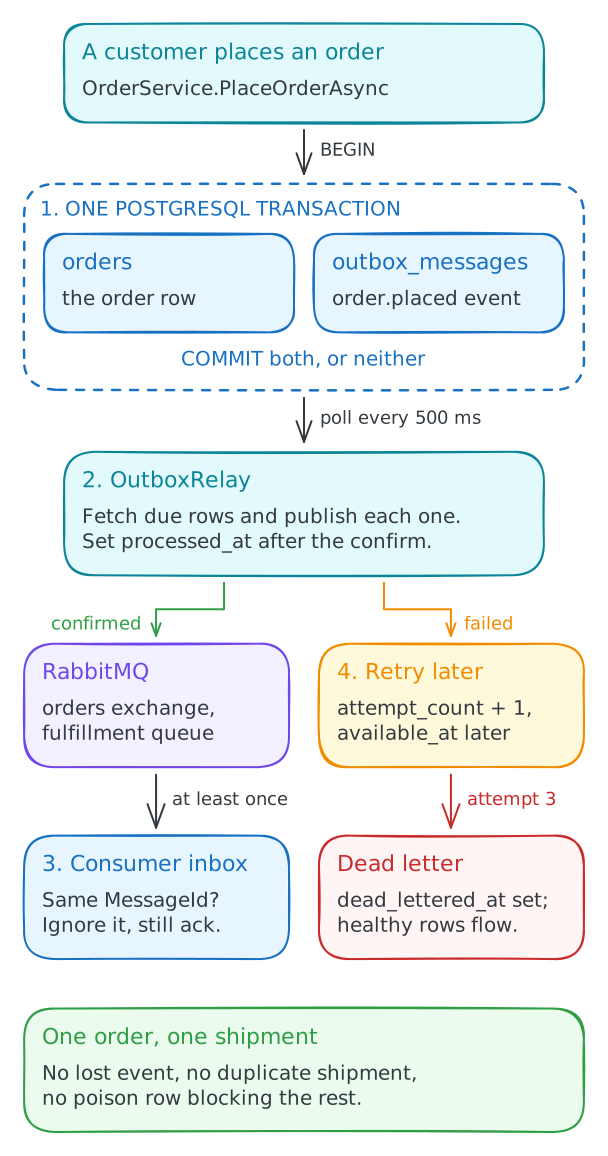
The order and its outbox row committed by one transaction, processed markers, attempt counts, and dead letters.
Orders are saved, but the warehouse never hears about them. Fix a small .NET service backed by real PostgreSQL and RabbitMQ: store the event with the order, relay it reliably, make duplicates harmless, and quarantine poison messages. About 30 minutes.
Intermediate · C#, PostgreSQL, RabbitMQ · About 30 minutes · Disposable browser workspace · Pro workspace in private beta
Labs courses
Store the event with the order, relay it to RabbitMQ, and make duplicates and poison messages harmless.
4 lessons · about 30 minutes
See the lessonsTurn a slow endpoint into 202 Accepted, a background worker, and polling on real PostgreSQL, then make it survive retries and crashes.
11 lessons · about 85 minutes
See the courseGrow one API into an app with PostgreSQL, Redis, a worker, and telemetry, then publish it as Docker Compose.
12 lessons · about 90 minutes
See the courseOne short lab, four lessons
Each lesson starts from the code the previous one left behind. You run a scenario that shows the failure, change a few lines, and run it again to prove the fix, so the last lesson tests the relay you actually built.
Lesson 1
The order commits, then the publish fails and the event is gone. Write the order and its outbox row in one PostgreSQL transaction.
Lesson 2
Run the relay and watch it publish the same rows on every poll, then mark each row processed once RabbitMQ confirms it.
Lesson 3
Lose a publisher confirm and the retry delivers twice. Reuse the outbox id as the message id and let the consumer's inbox ignore the repeat.
Lesson 4
One bad row blocks every order behind it. Retry it with backoff, then dead-letter it after the last attempt.
Implement the Transactional Outbox pattern
1 lab · 4 lessons · about 30 minutes · Intermediate
The lesson loop
The code that matters is open in the editor: the order service, the relay, the consumer, the RabbitMQ publisher, and the schema. You write the few lines that carry the pattern. If you get stuck, Reveal solution loads the working code for the lesson.
await using var transaction = await connection.BeginTransactionAsync(ct);

await using var order = new NpgsqlCommand(
    "INSERT INTO orders (id, customer_id, total_cents, status) VALUES ($1, $2, $3, 'placed')",
    connection, transaction);
// bind the order values, then ExecuteNonQueryAsync

await using var outbox = new NpgsqlCommand(
    "INSERT INTO outbox_messages (id, event_type, payload) VALUES ($1, $2, $3)",
    connection, transaction);
// bind the event id, "order.placed", and the payload as jsonb

await transaction.CommitAsync(ct);Run the lesson's scenario and watch it fail against real PostgreSQL and RabbitMQ.
Read the failure line and the counts behind it: orders, outbox rows, queue depth, and shipments.
Make one focused change of a few lines in the files the lesson names.
Press Check. It reads your terminal output and reruns the scenario against the live services.
Executable evidence
The order and its outbox row committed by one transaction, processed markers, attempt counts, and dead letters.
Publisher confirms, a durable queue, the message id on every delivery, and the queue depth after each poll.
An inbox table that turns a redelivered message into a no-op instead of a second shipment.
A broker outage, a lost confirm, and a poison message, injected on purpose so each fix has something to survive.
Live Pro workspaces are in private beta. The opening is announced in the Katabench newsletter, a short note when fresh kata land. No spam, unsubscribe anytime.